Playback vs. Jump Back
What Playback vs. Jump Back Does?
In GCXONE, effectively reviewing video footage is a core task for security operators. Two terms frequently encountered during video review are Playback and Jump Back. While both relate to viewing recorded footage, they serve distinct purposes — one refers to the overall capability of reviewing archived video, while the other is a specific navigation command used to skip backward through that video.
Why It Matters
Knowing the difference between Playback and Jump Back helps operators locate critical evidence faster — which is vital for meeting the 60–90 second handling SLA for critical alarms on the GCXONE platform.
How It Works
Playback — General Archive Access
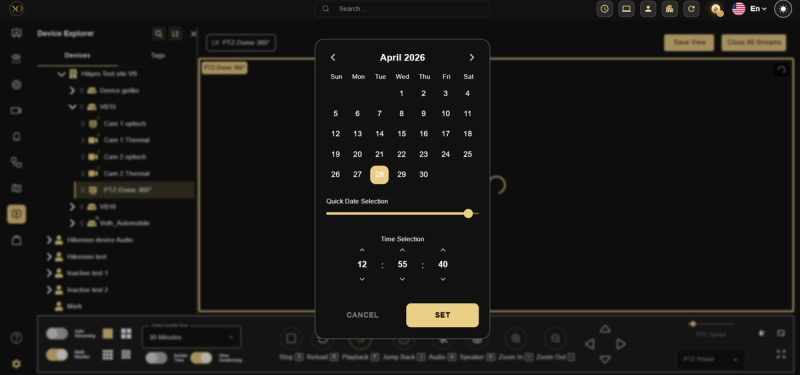
Playback is the general platform capability that allows users to access and review archived video footage from connected devices. It is the opposite of Live View, which shows real-time streaming.
- Functionality — During playback, operators navigate through a chronological timeline of all archived camera data. This is essential for conducting investigations, collecting evidence, and reconstructing past events.
- Controls — Typical playback controls include Play, Pause, Rewind, Fast Forward, and Stop.
- Device Support — GCXONE supports playback for a wide range of integrated hardware, including Hikvision, Dahua, Axis, Milestone, and Hanwha (Techwin). Note that some battery-operated devices, such as Reconeyez, may not support playback due to power conservation needs.
- Duration — Users can select specific durations for playback (e.g., 5 mins, 10 mins, 30 mins) to narrow down their search.
Jump Back — Specific Navigation Command
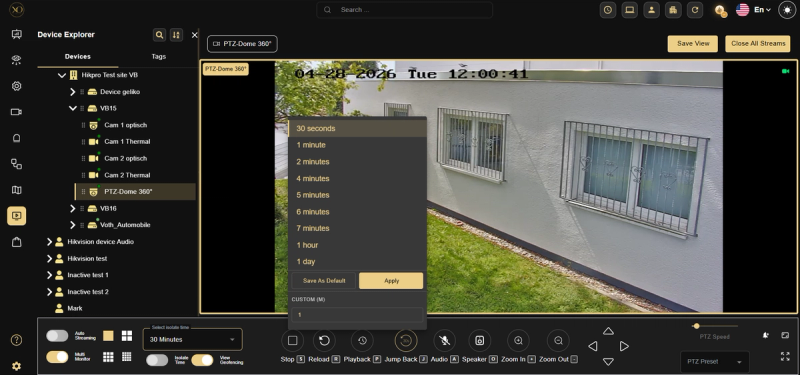
Jump Back (often labeled as "Jump Backward") is a specific navigation tool used within the playback interface to move the video marker back by a fixed, predefined interval.
- Fixed Intervals — In specific integrations like Hanwha (Techwin), Jump Back is a dedicated button that moves the video backward by exactly 10 minutes from the current playing point.
- Purpose — It is designed for speed and efficiency. Rather than manually dragging a slider or using standard rewind, Jump Back allows an operator to quickly skip to an earlier segment of the recording to find the start of an incident.
- Variations — While Hanwha uses a 10-minute jump, other systems integrated with GCXONE may offer similar skip functions for different intervals, such as 30-second steps.
Key Capabilities
| Feature | Playback | Jump Back |
|---|---|---|
| Category | General System Function | Specific Navigation Command |
| Primary Goal | Review any recorded data on the timeline — jump to a specific defined time. | Skip back a fixed amount of time instantly — jumps to the alarm time. |
| User Interaction | Dragging a timeline slider or selecting a date/time. | Clicking a single button to move back (e.g., 10 mins). |
| Standard Speed | Normal, slow-motion, or high-speed (e.g., up to 256x). | Instantaneous jump to a previous timestamp. |
| Device Context | Broadly supported across most NVRs and VMS. | Often a manufacturer-specific UI feature (e.g., Hanwha). |
Real-World Use Cases
- An operator receives an alarm — they use Jump Back to instantly rewind to the moment before the trigger without manually searching through the timeline.
- A supervisor needs to reconstruct a break-in that happened 3 hours ago — they use Playback to navigate to the exact date and time and review the footage chronologically.
- A Hanwha device operator misses a key moment — they click the Jump Back button to skip back exactly 10 minutes and review the segment again without interrupting their workflow.
Best Practices
- Use Playback when you need to investigate a specific time window or reconstruct a past event from scratch.
- Use Jump Back during active alarm review to quickly recheck what happened just before the trigger — without leaving your current view.
- Be aware of device limitations — some battery-operated devices like Reconeyez do not support Playback due to power conservation needs.
- Always verify the Jump Back interval for your specific device integration — intervals vary between manufacturers.