CMS Alarm Receiver Integration Guide
Overview
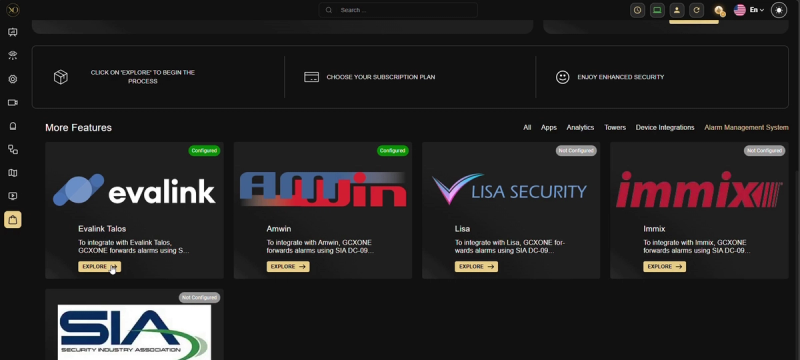
GCXONE now supports direct integration with third-party Alarm Management Systems (CMS) directly from the Marketplace. This removes the need for manual protocol configuration — all setup is done within the GCXONE interface. Two integration types are available: DC09-based receivers (Amwin, Lisa, Immix, and any SIA DC-09 compatible system) and Evalink Talos, a cloud-based alarm management platform.
DC09 Integration
SIA DC-09 is the industry-standard IP protocol for transmitting alarm signals from a monitoring system to a Central Monitoring Station (CMS). When an alarm event is triggered in GCXONE, the platform acts as the sending endpoint — packaging the alarm data and forwarding it to the CMS receiver at the configured IP address and port. GCXONE extends the standard DC-09 signal with a secure event link that opens a rich evidence view: pre-event footage, the event frame, post-event footage, and an animated GIF.
Step 1 — Navigate to the Marketplace
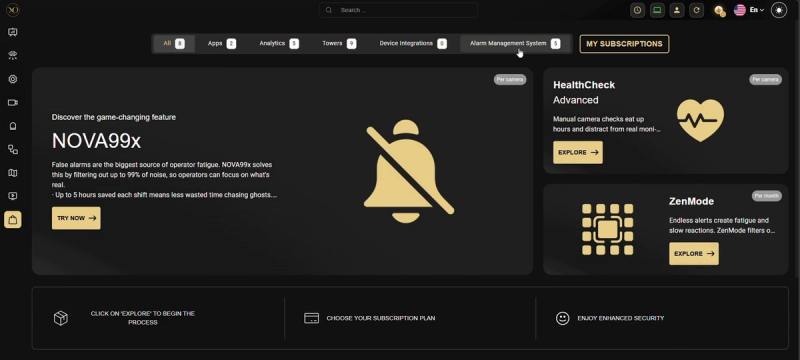
Go to Marketplace in the left navigation panel and click the Alarm Management System tab. The section displays all supported receivers with their current configuration status.

Step 2 — Configure the CMS Receiver
Click Explore on the CMS you want to configure, then click Configure to open the connection dialog. Enter the DC09 Receiver IP Address (the CMS server endpoint) and the DC09 Receiver Port (the TCP port). The same dialog applies to all DC09-based receivers — for unlisted systems, use "Other CMS System" which accepts the same fields.
Step 3 — Map Sites
After the CMS receiver is configured, a new Alarm Management System tab appears in each service provider's Configuration section. Navigate to Configuration → [Your Service Provider] → Alarm Management System. This table lists every site with its DC09 Account ID, assigned CMS, and connection status (green = configured, red = not mapped).
Step 4 — Set the DC09 Account ID
Click the edit icon on any site row. Enter the DC09 Account ID (must exactly match the account identifier on the CMS side) and optionally an Encryption Key to enable encrypted DC09 transmission. Once saved, alarms from that site will be forwarded automatically when triggered.
Evalink Talos Integration
Evalink Talos is a cloud-based alarm management platform. After selecting it in the Marketplace, click Configure and enter your Company ID and API Token from your Talos account. The token requires the "API Access" permission scope within Talos. Once configured, alarms triggered in GCXONE automatically appear in Talos as active events ready for operator processing.
Troubleshooting
- Site shows red indicator — the DC09 Account ID has not been set for that site. Click the edit icon and enter the account ID.
- Talos credential error — verify the Company ID and API Token. The token must have API Access scope and must not be expired.
- Alarms not forwarding — check that the CMS receiver IP and port are reachable from the GCXONE cloud. Firewall rules may need updating.
- Duplicate Account ID — each DC09 Account ID must be unique across all sites. GCXONE blocks duplicate assignments to prevent alarm routing conflicts.