
TimeSync
On this page
What TimeSync Does
TimeSync keeps the time and timezone of every connected device aligned across your sites, so every camera, alarm, and log stays on one verified timeline.
Why It Matters
Mismatched timestamps are more than an inconvenience. They create confusing timelines, cause teams to miss critical details, and produce records that don't hold up when it counts. In a compliance audit or security investigation, even a few seconds of drift can turn a straightforward review into hours of extra work, or worse.
TimeSync eliminates that risk, keeping devices synchronized so investigations move faster and teams can monitor more sites without adding staff. For business leaders, accurate and legally defensible records translate directly to cost savings by avoiding legal exposure.
How It Works
Timezone and sync settings are configured per device, not as one switch for the whole tenant. Each device has its own Timezone field and Time Zone Sync control, set from that device's Edit panel under Configuration → Devices.
For Dahua and HikVision devices, Time Zone Sync can hand off to NTP, so once the device's own NTP server is configured with GCXONE's server details, it keeps its clock in sync going forward on its own (see Additional Details below for the setup steps).

Figure 1: Time Zone Icon
Key Capabilities
- Device-Wide Synchronization: Eliminates timestamp mismatches across all sites, so your timelines are always clean and consistent
- Per-Device Timezone Control: Each device's timezone is set individually, per site and per device, from that device's own Edit panel.
- Trusted Evidence: Every frame carries an accurate, legally defensible timestamp
- Seamless Sync at Scale: Works across thousands of devices simultaneously without performance issues
- Zero Drift: Once NTP is set up on a device, it maintains accuracy on its own, with no further IT intervention required.
Real-World Use Cases
- A security team investigates an incident across multiple camera feeds from different sites. Because TimeSync keeps all devices aligned, they reconstruct the full timeline in minutes instead of hours.
- An organization undergoes a compliance audit. TimeSync ensures all recordings carry accurate, verifiable timestamps - creating tamper-proof records that hold up without dispute.
- A device restarts after a power outage and its clock resets. Once NTP is configured, the device re-syncs itself when it comes back online, preventing any gaps in the recording timeline.
- An Admin oversees operations across sites in different timezones. TimeSync ensures each device shows the correct local time, preventing cross-site confusion during investigations.
Additional Details
Automatic time synchronization is currently supported for HikVision and Dahua devices only.
To sync a Dahua or HikVision device over NTP:
- Open the device's Edit panel, select Time Zone Sync, then choose NTP. GCXONE displays the time server address and port it uses (for example, time1.nxgen.cloud on port 123).
- Log in to the device's own web portal, open its time settings, enable its NTP server, and enter those same server details.
- Save the change on the device, then return to GCXONE, rediscover the device, and save.
The device's own NTP server must be configured with these details first. Running Time Zone Sync from GCXONE before the device itself is set up returns an error.
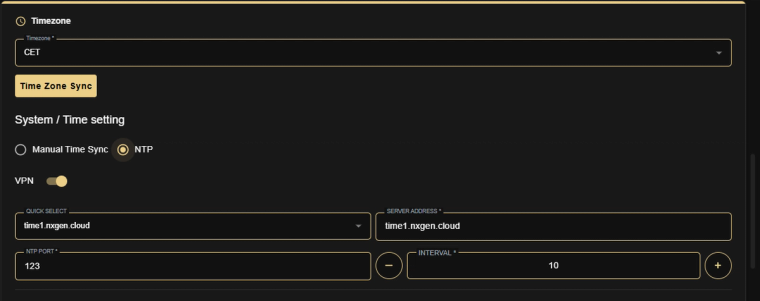
Figure 2: Time Zone Sync for HikVision and Dahua devices, set to NTP
Thank you — your feedback goes to the team that owns this page.